 Sage⇄
Sage⇄ Odoo
OdooLexware & Sage ↔ Odoo
Halten Sie Lexware oder Sage auf dem Laufenden, ohne etwas doppelt einzugeben.
Zahlreiche deutsche KMUs nutzen weiterhin Lexware oder Sage neben Odoo. zSYNC sorgt dafür, dass Rechnungen, Buchungen und Stammdaten zwischen den beiden fließen, sodass niemand die gleiche Rechnung in zwei Systeme eingeben muss.
Vertraut von 50+ Odoo-Unternehmen · 500+ verbundene APIs · Offizieller Odoo-Partner
Kommt Ihnen bekannt vor?
Zwei Systeme, ein Satz von Rechnungen und jemand gibt sie doppelt ein.
Odoo führt die Operationen, Lexware oder Sage führt die Bücher.
Wann immer die beiden Systeme die gleiche Rechnung benötigen, kopiert jemand sie von einem zum anderen von Hand.
Kunden- und Lieferantenstammdaten driftet auseinander.
Aktualisieren Sie eine Adresse in Odoo und vergessen Sie, sie in Lexware zu aktualisieren, und Ihr Buchhalter arbeitet jetzt mit veralteten Daten.
Eine doppelt eingegebene Rechnung ist eine doppelt gezählte Zahl.
Ein Tippfehler oder ein versäumter Eintrag während der manuellen Übertragung bedeutet, dass Ihre Bücher und Ihre Operationen nicht mehr übereinstimmen.

So funktioniert's
Drei Schritte. Alles in Odoo. Kein Code.
1
Abholen
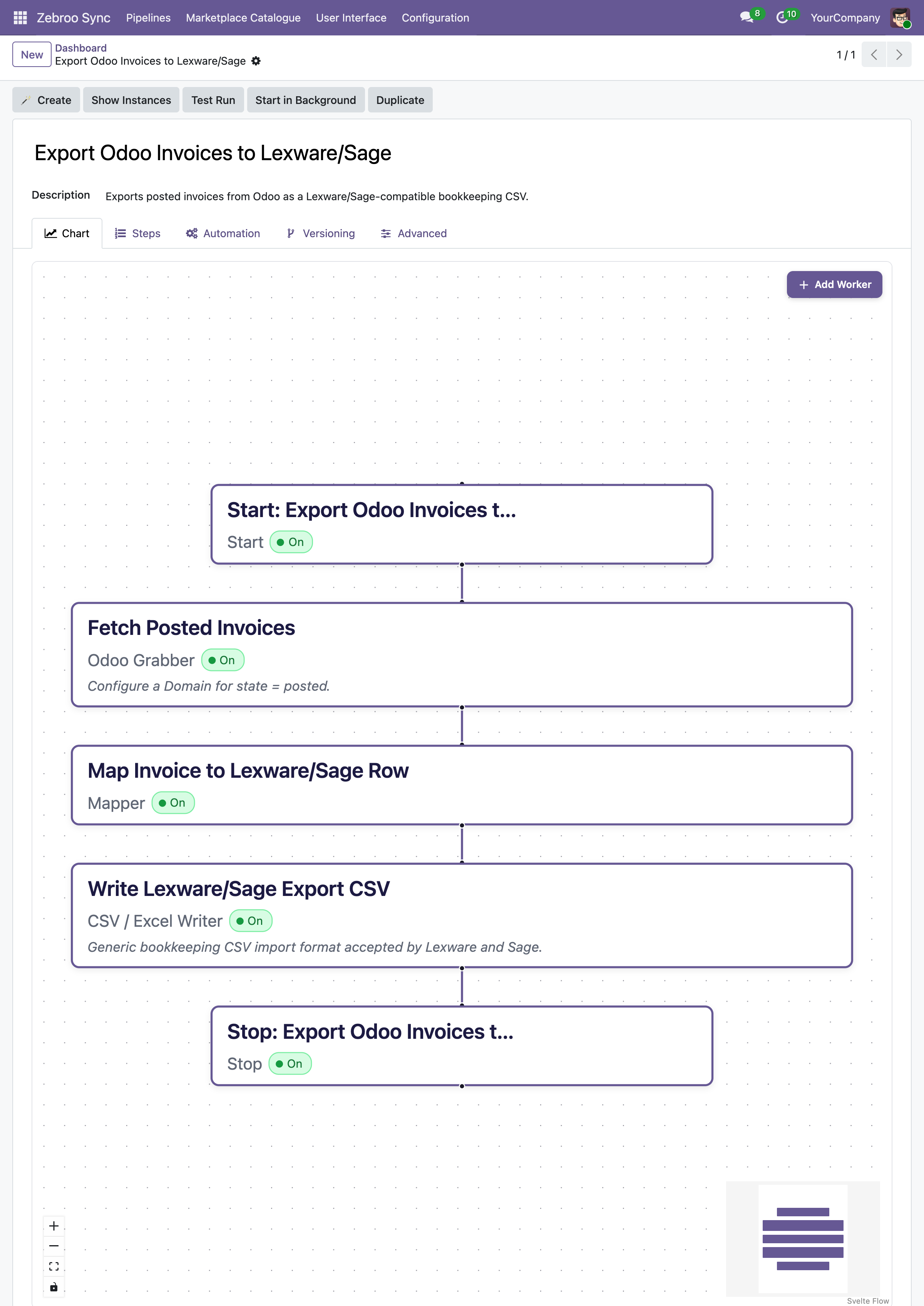
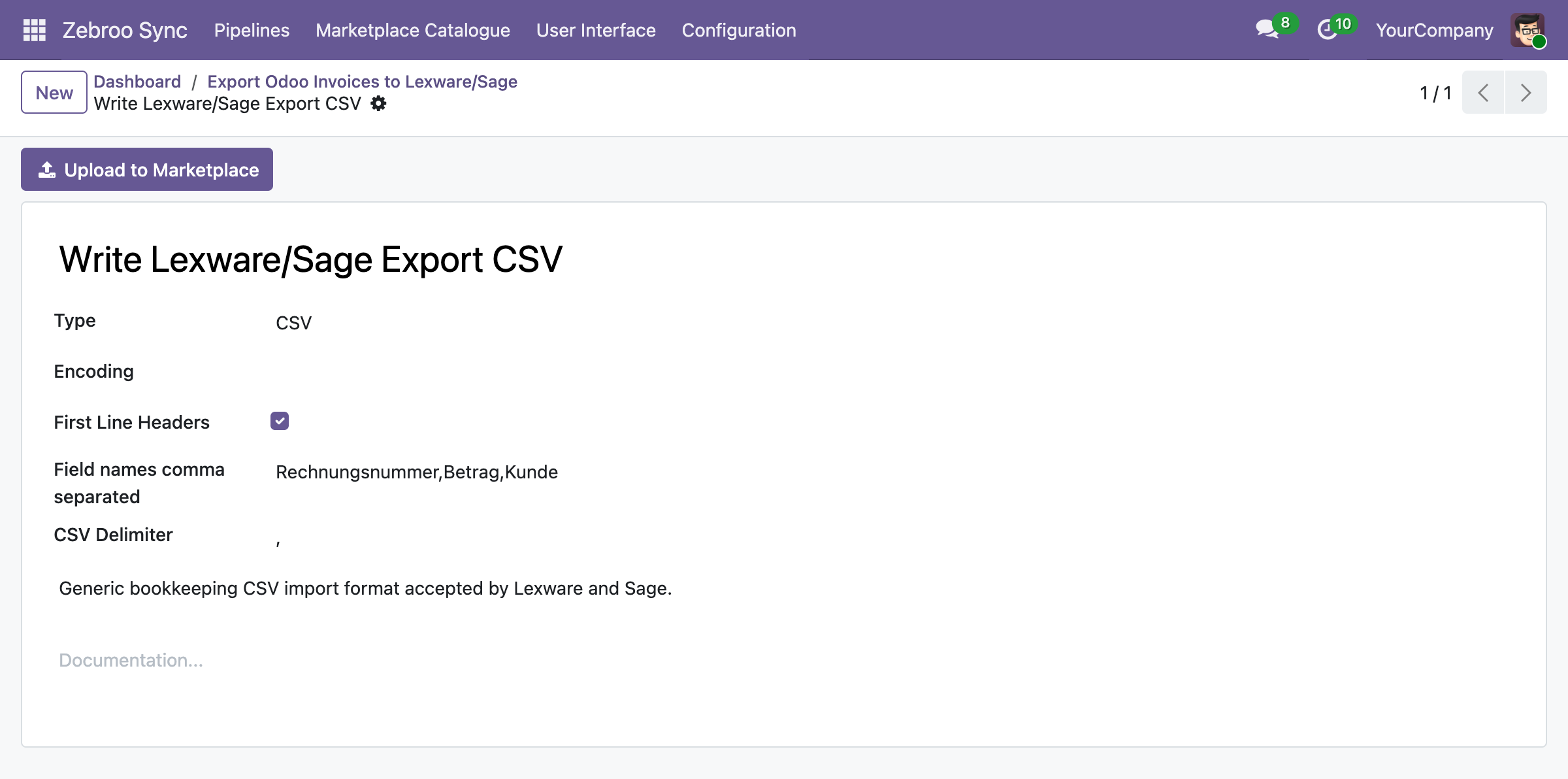
Nimmt neue und geänderte Rechnungen, Buchungen und Stammdaten von Odoo oder dem eigenen Export von Lexware/Sage auf.
2
Zuordnen
Ordnet Kunden, Lieferanten und Konten zwischen den beiden Systemen zu und übersetzt jeden in das erwartete Format des anderen.
3
Übertragen
Schreibt den Datensatz in das Zielsystem, sodass beide synchron bleiben, ohne dass jemand etwas erneut eingeben muss.
Läuft automatisch. Eine Rechnung, einmal eingegeben.
Was synchronisiert
Was zwischen Lexware / Sage und Odoo synchronisiert wird
Rechnungen & Buchungen
✓ Kundenrechnungen →
✓ Lieferantenrechnungen →
✓ Buchungssätze →
Stammdaten
✓ Kunden →
→ Lieferanten →
Zuverlässigkeit
✓ Duplikate entfernen →
✓ Konsistente Formatierung →
Brauchen Sie stattdessen einen DATEV-Export? Sehen Sie sich die DATEV-Pipeline an.
Warum Teams zu zSYNC wechseln
Messbare Ergebnisse, nicht nur Funktionen.
3 → 1
Support-Kosten senken
In einem Projekt sank der Support-Aufwand von drei Vollzeitkräften auf eine Person mit 10 % Zeitaufwand. Sie besitzen die Integration, also zahlen Sie nicht mehr für jede Anpassung an eine Agentur.
1 Eintrag, nicht 2
Keine doppelte Buchführung mehr
Jede Rechnung wird einmal erfasst. Odoo und Lexware/Sage bleiben beide aktuell, ohne einen zweiten manuellen Durchlauf.
0 Ausfälle
Übersteht jedes Odoo-Update
Ihre Shopify-Integration lebt im Frontend, nicht im individuellen Code, und läuft deshalb auch nach Odoo-Upgrades weiter, statt sie zu blockieren.
Kein Bus-Faktor
Kein Bus-Faktor
Jedes IT-affine Teammitglied kann Schnittstellen bauen, besitzen und pflegen — kein Entwickler auf Abruf, kein Single Point of Failure.
Aufgebaut auf einem bewährten Framework
Offizieller Odoo-Partner · Vertraut von 50+ Unternehmen



Hunderte
gebaute Schnittstellen
50+
aktive Kunden
500+
verbundene APIs
99,9%
Verfügbarkeit
Wir kümmern uns um alles. Sie konzentrieren sich auf Ihr Geschäft.
Professionelle Einrichtung durch Zebroo — kein Self-Service.
1
Installieren
Wir richten zSYNC in Ihrem Odoo ein und verbinden es mit Lexware oder Sage.
2
Konfigurieren
Wir erstellen Ihre erste Rechnung und den Stammdatensynchronisation, abgestimmt auf Ihre Kontostruktur.
3
Schulen
Wir übergeben es, damit Ihr Team es selbst besitzt und erweitert.
In nur 1–3 Tagen live.
Kostenlose Demo buchen
Preise
Ein Preis pro Verbindung. Skaliert mit Ihrem Wachstum.
Sie zahlen pro Verbindung — nicht pro Nutzer, nicht pro Datensatz. Jeder Plan enthält den vollen Funktionsumfang, selbst gehostet und DSGVO-konform.
✓Voller Funktionsumfang in jedem Plan
✓Keine Nutzerbegrenzung
✓Immer die neueste Version
✓Selbst gehostet · DSGVO-konform
Der von uns genannte Preis gilt für die gesamte Laufzeit Ihres Vertrags.
FAQ
Häufig gestellte Fragen
Welche Odoo-Versionen unterstützt zSYNC?
zSYNC läuft innerhalb Ihres Odoo und unterstützt die aktuellen Community- und Enterprise-Versionen. Da Ihre Schnittstellen im Frontend liegen — nicht im individuellen Code — laufen sie auch nach Odoo-Upgrades weiter, statt sie zu blockieren.
Sind meine Daten sicher?
zSYNC ist selbst gehostet in Ihrem eigenen Odoo, sodass Ihre Daten Ihre Umgebung nie verlassen. Es ist DSGVO-konform, und Sie kontrollieren jede Verbindung, jeden Zugangsdaten-Satz und jede Pipeline direkt.
Kann ich in beide Richtungen synchronisieren, Odoo zu Lexware/Sage und zurück?
Ja. Die meisten Kunden synchronisieren Rechnungen in eine Richtung und Stammdaten in beide Richtungen, sodass das System, in dem ein Datensatz aktualisiert wird, automatisch mit dem anderen aufholt.
Was passiert, wenn eine Synchronisierung fehlschlägt — gibt es Ausfallzeiten?
Fehler bringen Ihr System nicht zum Stillstand. zSYNC läuft auf Queue-Jobs, sodass sich Schnittstellen nicht gegenseitig blockieren. Jeder Lauf wird überwacht, sodass Sie einen fehlgeschlagenen Lauf wiederholen, ein Feld ergänzen und genau dieselben Daten erneut verarbeiten können.
Eine Rechnung, einmal erfasst, überall
Kostenlose Demo buchenUnverbindlich. 30-minütige Session. Live erleben.