SQL Database ↔ Odoo
SQL ↔ Odoo: Connect any database automatically.
Stop having a developer write a one-off export/import script for every legacy system you need data from. zSYNC connects Odoo directly to any SQL database (MySQL, PostgreSQL, Microsoft SQL Server, MariaDB, Oracle, or anything reachable via ODBC/JDBC), with no data warehouse, middleware layer, or nightly batch job in between.
Trusted by 50+ Odoo companies · 500+ connected APIs · Official Odoo Partner
Sound familiar?
Your legacy database and Odoo are two islands. Someone connects them by hand.
Who owns your interfaces?
When your SQL sync lives in a script on a developer's laptop or with an agency, one sick day turns into a business problem.
A typo shouldn't cause an outage.
Fixing a query or column mapping means editing code, testing against production data, and hoping nothing else breaks on the next cron run.
Every legacy system resets the clock to zero.
Every database you need to connect starts a brand-new integration project: weeks of developer time, every single time.

How it works
Three steps. All inside Odoo. No code.
1
Query
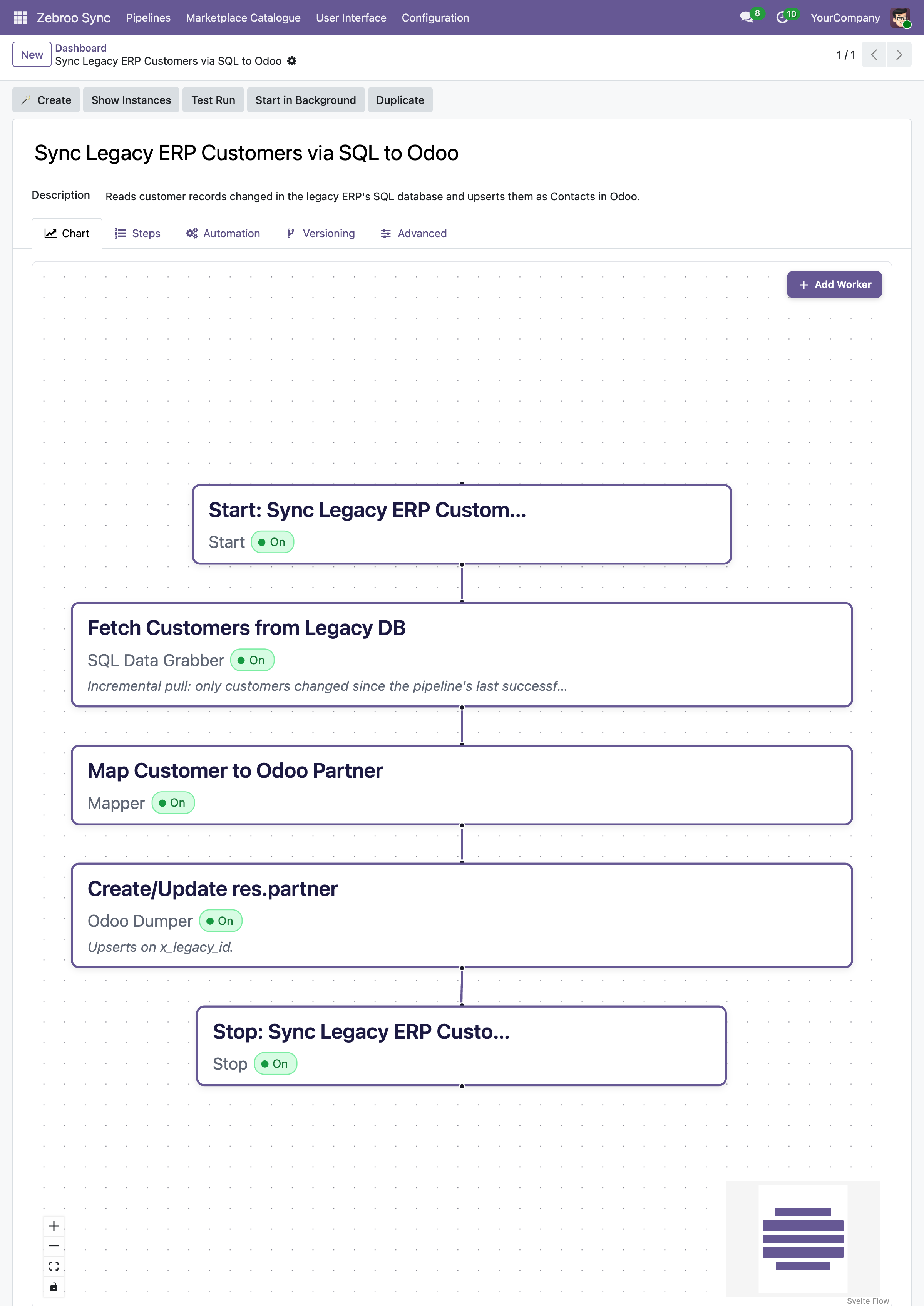
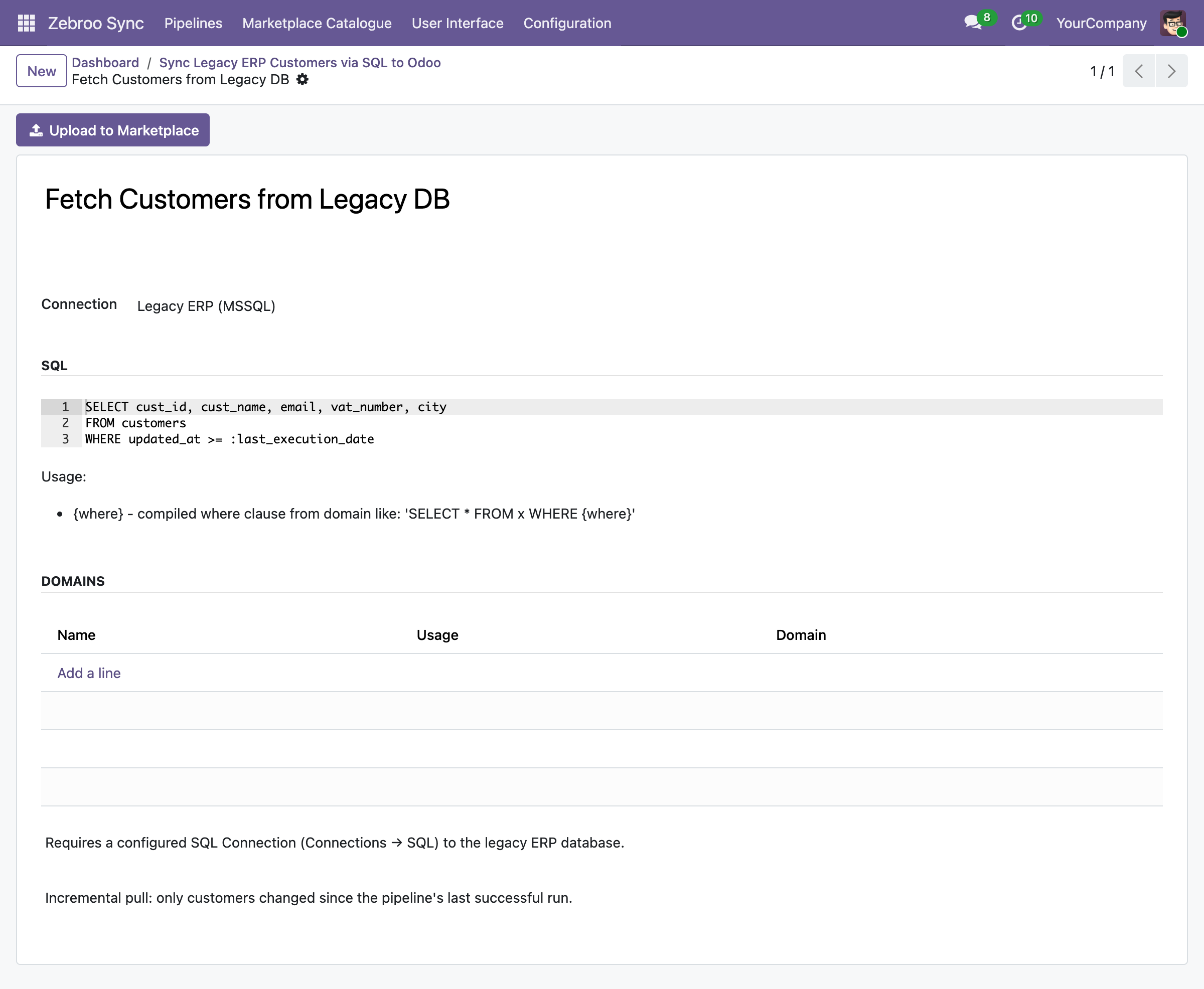
Run a native SQL query against MySQL, PostgreSQL, Microsoft SQL Server, MariaDB, Oracle, or any ODBC/JDBC source. zSYNC only pulls the rows that changed since the last run: delta sync instead of full table dumps.
2
Map
Map the result columns to Odoo fields in the visual flow tab. Handle type conversions, joins, and transformations right there: changes take effect instantly, no redeployment required.
3
Write
Write the records into Odoo, or push Odoo data back into your database with a native SQL statement. Every run is monitored, and you can retry any failed run with one click.
Runs automatically. No manual exports. No copy-paste.
What syncs
What syncs between any SQL database and Odoo
Master Data
✓ Customers / Contacts →
✓ Products / Materials ↔
✓ Price lists →
✓ Any custom table ↔
Transactions
✓ Orders →
✓ Invoices →
✓ Stock movements ↔
✓ Any custom query →
Database Support
✓ MySQL / MariaDB
✓ PostgreSQL
✓ Microsoft SQL Server
✓ Any ODBC/JDBC source
→ one-way ↔ two-way
Any table, any query. You write the SQL, zSYNC handles the rest.
Any table, any query. You write the SQL, zSYNC handles the rest.
Why teams switch to zSYNC
Measurable results, not just features.
3 → 1
Cut support costs
On one project, support dropped from three full-time staff to one person working 10% of their time. You own the integration yourself, so you stop paying an agency for every change.
5 Min.
Live in minutes, not weeks
A working SQL connection is up in 5 minutes. A proof of concept takes minutes, complex workflows take hours: not the weeks a custom migration script usually needs.
0 Outages
Survives every Odoo upgrade
Your SQL integration lives in the front end, not in custom code, so it keeps running after Odoo upgrades instead of blocking them.
No Bus Factor
No key-person risk
Any IT-savvy team member can build, own, and maintain integrations: no DBA on standby, no single point of failure.
Built on a proven framework
Official Odoo Partner · Trusted by 50+ companies



Hundreds
interfaces built
50+
active customers
500+
connected APIs
99.9%
uptime
We handle everything. You focus on your business.
Professional setup by Zebroo, not self-service.
1
Install
We set up zSYNC in your Odoo and configure the database connection.
2
Configure
We build your first SQL pipeline, tailored to your schema and Odoo model.
3
Train
We hand it over so your team owns and extends it directly.
Live in just 1-3 days.
Book a Free Demo
Pricing
One price per connection. Scale as you grow.
You pay per connection, not per user, not per record. Every plan includes the full feature set, self-hosted and GDPR-compliant.
✓Full feature set on every plan
✓No user limits
✓Always the latest version
✓Self-hosted · GDPR-compliant
The price we quote holds for your entire contract term.
FAQ
Frequently Asked Questions
Which Odoo versions does zSYNC support?
zSYNC runs inside your Odoo and supports the current Community and Enterprise versions. Because your integrations live in the front end (not in custom code), they keep running after Odoo upgrades instead of blocking them.
Is my data secure?
zSYNC is self-hosted in your own Odoo, so your data never leaves your environment. It's GDPR-compliant, and you control every connection, every credential, and every pipeline directly.
Does it connect to any SQL database?
Yes, zSYNC supports MySQL, MariaDB, PostgreSQL, Microsoft SQL Server, and any ODBC/JDBC-compatible source. You write the SQL query; zSYNC handles execution, result mapping, and scheduling.
What happens if a sync fails: is there downtime?
Errors don't bring your system down. zSYNC runs on queued jobs, so integrations don't block each other. Every run is monitored, so you can retry a failed run, fix a field, and reprocess the exact same data.
Own your SQL integrations: don't rent them.
Book a Free DemoNo commitment. 30-minute session. See it live.