
↔

Orders sync themselves.
Hören Sie auf, Entwickler für eine handgecodete Shopify-Integration zu bezahlen, die bei jedem Theme- oder App-Update wieder bricht. zSYNC verbindet Ihren Shopify-Shop direkt in Ihrer Odoo-Instanz: keine Middleware, kein nächtlicher Batch-Export, keine Ausfallzeiten.
Vertraut von 50+ Odoo-Unternehmen · 500+ verbundene APIs · Offizieller Odoo-Partner
Kommt Ihnen bekannt vor?
Shopify und Odoo sollten miteinander sprechen. Stattdessen überbrückt sie derzeit jemand von Hand.
Wem gehören Ihre Schnittstellen?
Wenn Ihre Shopify-Synchronisierung nur im Kopf eines Entwicklers oder im Code einer Agentur existiert, wird ein Krankheitstag zum Umsatzproblem.
Ein Tippfehler sollte keinen Ausfall verursachen.
Ein Feld-Mapping zu korrigieren bedeutet, Code zu bearbeiten, neu auszurollen und zu hoffen, dass beim nächsten Theme-Update nichts anderes kaputtgeht.
Bestellungen stauen sich, während Exporte laufen.
Nächtliche Batch-Exporte bedeuten, dass der Odoo-Bestand Shopify immer um Stunden hinterherhinkt — und jeder fehlgeschlagene Export bedeutet manuelle Nacharbeit.
So funktioniert's
Drei Schritte. Alles in Odoo. Kein Code.
1
Abholen
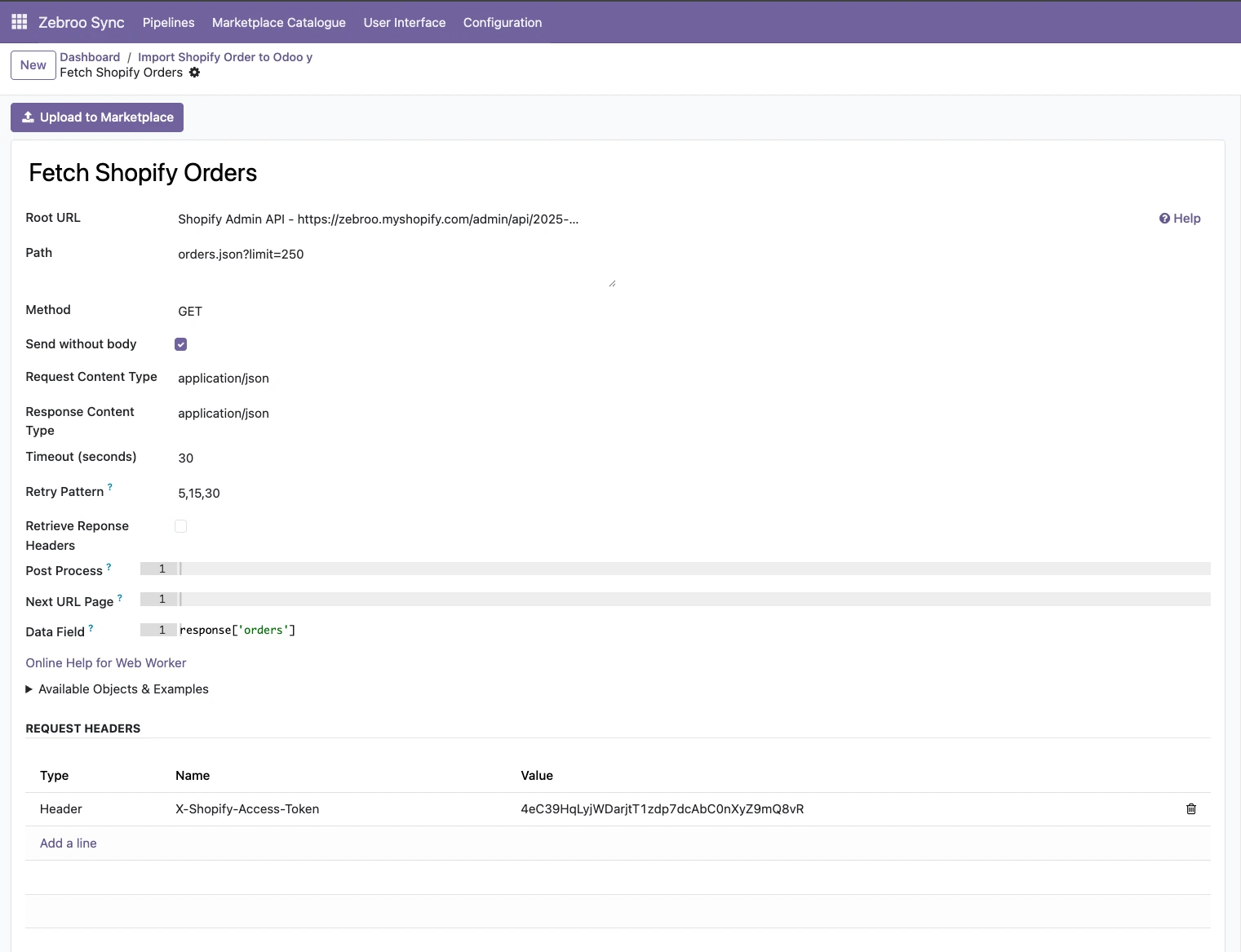
Bestellungen, Kunden und Produkte werden per REST API aus Shopify geladen. zSYNC holt nur, was sich seit dem letzten Lauf geändert hat — Delta-Sync statt vollständigem Re-Import.
2
Zuordnen
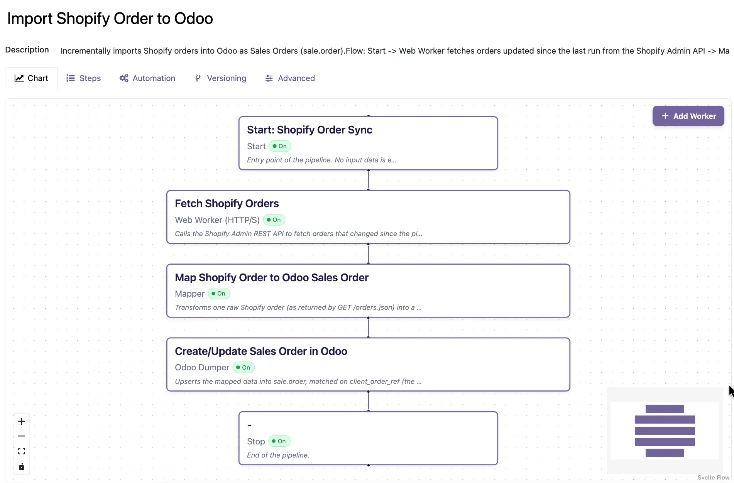
Ordnen Sie Shopify-Felder im visuellen Flow-Tab Odoo-Feldern zu. Varianten, Steuerzeilen und Transformationen lassen sich live bearbeiten, ganz ohne erneutes Deployment.
3
Übertragen
Bestellungen werden in Odoo Verkauf geschrieben, und die Lagerbestände fließen zurück an Shopify. Jeder Lauf wird überwacht, und Sie können jeden Fehlschlag mit einem Klick erneut ausführen.
Läuft automatisch. Keine manuellen Exporte. Kein Copy-Paste.
Was synchronisiert wird
Was zwischen Shopify und Odoo synchronisiert wird
Bestellungen & Verkauf
✓ Bestellungen →
✓ Bestellpositionen →
✓ Zahlungsbedingungen →
✓ Rückerstattungen →
Produkte & Bestand
✓ Produkte / Varianten →
✓ Lagerbestände ⇔
✓ Preise ⇔
✓ Kollektionen →
Kunden & Rechnungsstellung
✓ Kunden →
✓ Adressen →
✓ Rechnungen →
✓ Beliebiger benutzerdefinierter Webhook ↔
→ einseitig ↔ zweiseitig
Ihr Objekt fehlt in der Liste? Es ist nur eine Pipeline entfernt.
Ihr Objekt fehlt in der Liste? Es ist nur eine Pipeline entfernt.
Warum Teams zu zSYNC wechseln
Messbare Ergebnisse, nicht nur Funktionen.
3 → 1
Support-Kosten senken
In einem Projekt sank der Support-Aufwand von drei Vollzeitkräften auf eine Person mit 10 % Zeitaufwand. Sie besitzen die Integration, also zahlen Sie nicht mehr für jede Anpassung an eine Agentur.
5 Min.
Live in Minuten statt Wochen
Eine funktionierende Shopify-Verbindung steht in 5 Minuten. Ein Proof of Concept in Minuten, komplexe Abläufe in Stunden — nicht die Wochen, die eine individuelle Integration sonst braucht.
0 Ausfälle
Übersteht jedes Odoo-Update
Ihre Shopify-Integration lebt im Frontend, nicht im individuellen Code, und läuft deshalb auch nach Odoo-Upgrades weiter, statt sie zu blockieren.
Kein Bus-Faktor
Kein Bus-Faktor
Jedes IT-affine Teammitglied kann Schnittstellen bauen, besitzen und pflegen — kein Entwickler auf Abruf, kein Single Point of Failure.
Aufgebaut auf einem bewährten Framework
Offizieller Odoo-Partner · Vertraut von 50+ Unternehmen




Hunderte
gebaute Schnittstellen
50+
aktive Kunden
500+
verbundene APIs
99,9%
Verfügbarkeit
Wir kümmern uns um alles. Sie konzentrieren sich auf Ihr Geschäft.
Professionelle Einrichtung durch Zebroo — kein Self-Service.
1
Installieren
Wir richten zSYNC in Ihrem Odoo ein und konfigurieren die Shopify-Verbindung.
2
Konfigurieren
Wir bauen Ihre erste Shopify-Pipeline, passend zu Ihrem Katalog und Ihren Bestellungen.
3
Schulen
Wir übergeben es, damit Ihr Team es selbst besitzt und erweitert.
In nur 1–3 Tagen live.
Kostenlose Demo buchen
Preise
Ein Preis pro Verbindung. Skaliert mit Ihrem Wachstum.
Sie zahlen pro Verbindung — nicht pro Nutzer, nicht pro Datensatz. Jeder Plan enthält den vollen Funktionsumfang, selbst gehostet und DSGVO-konform.
✓Voller Funktionsumfang in jedem Plan
✓Keine Nutzerbegrenzung
✓Immer die neueste Version
✓Selbst gehostet · DSGVO-konform
Der von uns genannte Preis gilt für die gesamte Laufzeit Ihres Vertrags.
FAQ
Häufig gestellte Fragen
Welche Odoo-Versionen unterstützt zSYNC?
zSYNC läuft innerhalb Ihres Odoo und unterstützt die aktuellen Community- und Enterprise-Versionen. Da Ihre Schnittstellen im Frontend liegen — nicht im individuellen Code — laufen sie auch nach Odoo-Upgrades weiter, statt sie zu blockieren.
Sind meine Daten sicher?
zSYNC ist selbst gehostet in Ihrem eigenen Odoo, sodass Ihre Daten Ihre Umgebung nie verlassen. Es ist DSGVO-konform, und Sie kontrollieren jede Verbindung, jeden Zugangsdaten-Satz und jede Pipeline direkt.
Synchronisiert es nur Bestellungen, die seit dem letzten Lauf eingegangen sind?
Ja — zSYNC führt einen Delta-Sync durch und lädt nur, was sich seit dem letzten Lauf geändert hat. Eine fehlerhafte Bestellung bringt nicht den ganzen Batch zum Absturz, und Sie können jeden fehlgeschlagenen Lauf mit einem Klick erneut ausführen.
Was passiert, wenn eine Synchronisierung fehlschlägt — gibt es Ausfallzeiten?
Fehler bringen Ihr System nicht zum Stillstand. zSYNC läuft auf Queue-Jobs, sodass sich Schnittstellen nicht gegenseitig blockieren. Jeder Lauf wird überwacht, sodass Sie einen fehlgeschlagenen Lauf wiederholen, ein Feld ergänzen und genau dieselben Daten erneut verarbeiten können.
Besitzen Sie Ihre Shopify-Integration — statt sie zu mieten.
Kostenlose Demo buchenUnverbindlich. 30-minütige Session. Live erleben.